
Fixes · Customer accounts
Shopify create_customer form not creating customers
The fix
On Shopify’s current customer accounts, the theme no longer registers anyone. A create_customer form lands on the sign-in page and saves nothing it carried: no customer, no tags, no note.
Shopify signs people in with an emailed code and creates the customer itself. If you only need an email and a tag, Shopify’s customer form still creates a customer. If you need more, such as a trade application with a VAT number and approval, post the form to a small function of your own that creates and tags the customer through the Admin API. If your trade prices run on Shopify B2B, its company account requests do this without code.
01Why the form saves no one
The create_customer form posts to /account, and Shopify’s docs describe it as a form “for creating a new customer account” that belongs to the customers/register template (Shopify, form tag). That template is part of legacy customer accounts. On the current version, customer accounts run apart from the theme: “Legacy customer account templates are deprecated,” and customers/register is among the templates that “no longer need to be included in your theme” (Shopify, Templates).
Signing in changed with it. Customers “enter their email address and receive a one-time 6-digit verification code”, “A password isn’t required to sign in”, and an email with no profile behind it gets one: “a new customer profile is created automatically” (Shopify Help, Customer accounts). There’s no registration step left for a theme form to feed.
When we tested a create_customer form on a store running the current customer accounts (16 Oct 2026), Shopify redirected to the sign-in page and dropped the tags, the note and the VAT number the form carried. No customer was created.
More stores will meet this. Since 26 Feb 2026, legacy accounts are “no longer available to new stores and existing stores not using it”, and Shopify says a final sunset date will be announced later in 2026 (Shopify changelog). A registration form that works today on legacy accounts stops when the store upgrades, and a store on legacy accounts that moves to a theme without the legacy templates is upgraded automatically (same changelog).
On the Shopify Community, a waitlist built on create_customer redirected to the home page and added no one (Aug 2022); the thread has no answer. On a newer thread (Apr 2026), a store moving off legacy accounts asks how to keep a registration form that tags customers for special pricing, and the reply is that the new account pages need an app to change.
02Choose a route: the customer form, a small function or B2B
For store owners
Check which customer accounts you’re on
In Settings > Customer accounts. On the current version, a theme sign-up form with a password field, or one that sets tags or a note, won’t create the account.
Test the form
Fill it in with an address you own, then search for that address under Customers. If no customer appears, or it appears without its tags and details, the form needs rebuilding.
Choose the route
An email and a tag only: your developer can switch the form to Shopify’s
customerform. Anything more (several fields, a VAT number, approval): a small function, below. An app that adds custom fields to sign-up is the third way.Selling trade through Shopify B2B? Use its request form
If your trade prices come from B2B companies and catalogs rather than customer tags, Shopify has this built in. Company account requests use a Shopify Forms form, can save extra fields as customer or company metafields, and hold each new company until you approve it (Shopify Help). B2B is on the Basic plan and up (Shopify Help).
Tell people how to sign in
With the current accounts, customers sign in with an emailed code, not a password. Say so where the form says thanks.
For developers: the `customer` form, or a small function
Shopify’s customer form creates “a new customer without registering a new account” (Shopify, form tag). It takes an email and tags (Shopify, the password template’s sign-up form), and the customer it creates has accepts_marketing set to true (Shopify, Email consent). That suits a newsletter or a waitlist. It doesn’t suit a trade application, where people haven’t asked for marketing and you need more than an email.
For that, the form posts to a function you host (ours run on Vercel), and the function creates or updates the customer through the Admin API, with an app token that holds write_customers only. Shopify no longer lets you create custom apps in the admin (Shopify), so the app comes from the Dev Dashboard; ours is installed on the one store by custom distribution. The applicant then signs in by emailed code like any other customer. The theme side:
form.addEventListener('submit', async (event) => {
  event.preventDefault();
  const data = Object.fromEntries(new FormData(form));
  try {
    const res = await fetch(form.action, {
      method: 'POST',
      headers: { 'Content-Type': 'text/plain' }, // a simple request: no CORS preflight
      body: JSON.stringify(data),
    });
    const out = res.ok ? await res.json() : null;
    if (out && out.ok) showDone(out.status); // 'approved' or 'pending', shown in place
    else showError();
  } catch (error) {
    showError();
  }
});// Env: SHOPIFY_STORE_DOMAIN (the .myshopify.com domain), SHOPIFY_ADMIN_TOKEN (write_customers only)
const ADMIN = `https://${process.env.SHOPIFY_STORE_DOMAIN}/admin/api/2026-07/graphql.json`;
async function admin(query, variables) {
const res = await fetch(ADMIN, {
method: 'POST',
headers: { 'Content-Type': 'application/json', 'X-Shopify-Access-Token': process.env.SHOPIFY_ADMIN_TOKEN },
body: JSON.stringify({ query, variables }),
});
const json = await res.json();
if (!res.ok || json.errors) throw new Error('Shopify answered ' + res.status);
return json.data;
}
const CREATE = `mutation ($input: CustomerInput!) {
customerCreate(input: $input) { customer { id } userErrors { field message } }
}`;
export default async function handler(req, res) {
if (req.method !== 'POST') return res.status(405).end();
const a = typeof req.body === 'string' ? JSON.parse(req.body || '{}') : req.body;
if (a.website) return res.status(200).json({ ok: true, status: 'pending' }); // honeypot: write nothing
const approved = passesYourCheck(a.vat); // your rule for instant approval
const input = {
email: a.email,
firstName: a.firstName,
lastName: a.lastName,
tags: [approved ? 'trade' : 'trade-pending'],
metafields: [
{ namespace: 'trade', key: 'business_name', type: 'single_line_text_field', value: a.business },
],
};
const r = await admin(CREATE, { input });
if (r.customerCreate.userErrors.length) return res.status(422).json({ error: 'check' });
return res.status(200).json({ ok: true, status: approved ? 'approved' : 'pending' });
}- Check the request’s origin against your store’s domains, cap the body size and keep a hidden honeypot field. The function writes customers, so treat every field as untrusted.
- Answer with CORS headers for your store’s domains, or the page can’t read the reply.
- Look the email up first. If the customer exists, update them instead, and decide what you never overwrite (on the store we built: a trade tier already on the record, and email marketing consent).
- Set email marketing consent only when the applicant ticked a box for it.
- Straight after a create, the Admin API’s customer search can lag a second or two behind: a quick double submit can be refused as a taken email and then not find the customer. Wait and look again before giving up.
- To email the shop when an application arrives, Shopify Flow can do it: a workflow on Customer tags added with Send internal email. On the store we built, the function adds the alert tag in a separate step after the create, because a tag set inside
customerCreatedidn’t count as added for Flow.
03Apply as a new customer, then sign in as them
Apply as a new customer
Use an address you own, send the form, then find the customer under Customers, with the tags and details you expect.
Sign in as them
Use Sign in on the store, enter the address and the code from your inbox. You should land in the same customer, not a second one.
Apply again with the same email
Nothing you meant to keep on that customer should change.
Check what the tag switches on
If tags turn on trade prices or hidden pages, check a product page and the basket while signed in. On the store we built, a tag change reached a shopper who was already signed in only after they signed in again.
Delete your test customers
So they don’t land in your marketing or your reports.
From our work
04Dovecote’s trade application, rebuilt
Dovecote, a candle and home fragrance maker whose store we look after, sells to hospitality and wholesale buyers at their own prices, switched on by a customer tag. Its stockist page carried a trade application built on create_customer: an applicant with a VAT number was meant to be approved on the spot, and everyone else held for the team to approve.
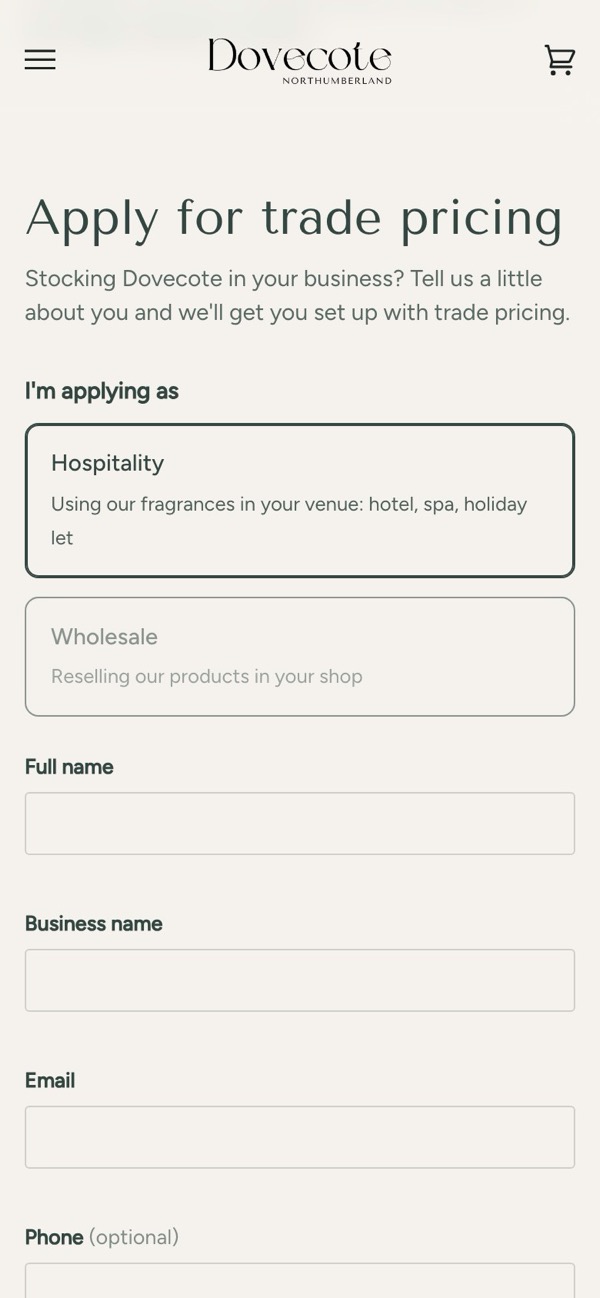
Before. On the store’s current customer accounts, the form sent applicants to the sign-in page and created no one (tested 16 Oct 2026). The VAT number, the business details and the tag never reached Shopify.
After (16 Oct 2026). The form posts to a small function. A VAT number that passes HMRC’s check-digit test (the arithmetic every real number passes; it doesn’t prove the business is registered) is tagged with its trade tier at once. Anyone else is saved as pending. Either way Shopify Flow emails the shop, with signed links to approve as hospitality or wholesale or to turn the application down, and an undo link on instant approvals. The page then says in place whether the applicant is approved, with a sign-in button, or pending.
We proved it live with a test application: the customer was created, the alert arrived with its three buttons, approving as wholesale set the tag, a second press said it was already approved, and a tampered link was refused.
- In our live log“Trade applications are now checked and approved automatically”
The bigger picture
05What else stops when the accounts change
Moving to the current customer accounts quietly retires everything a theme did at sign-up: registration forms, extra fields, tags set by the form, redirects afterwards. None of it shows an error. It stops.
If your store relies on sign-up for trade prices, member access or approvals, check it before you upgrade, or straight after. A small function like the one above is the kind of thing our custom apps work covers: built to run on its own, with the store’s team still in charge of approvals.
06Sources
Every step and claim above comes from one of these, or from the fix on the store it describes.
- Shopify developers: Liquid tags, form (create_customer and customer)
- Shopify developers: Templates (legacy customer account templates)
- Shopify Help Center: Customer accounts
- Shopify developer changelog: Legacy customer accounts are deprecated (Feb 2026)
- Shopify developers: The password template (the sign-up form and its tags)
- Shopify developers: Email consent
- Shopify developers: customerCreate (GraphQL Admin API)
- Shopify developers: Generate access tokens for admin-created custom apps
- Shopify Help Center: Company account requests (B2B)
- Shopify Help Center: B2B on Shopify (plans)
- Shopify Community: Customer not being created with create_customer form (Aug 2022)
- Shopify Community: Upgrading to customer accounts (Apr 2026)
Sources checked on .