Fixes · Cart attributes
Order note or cart attributes missing from some orders
The fix
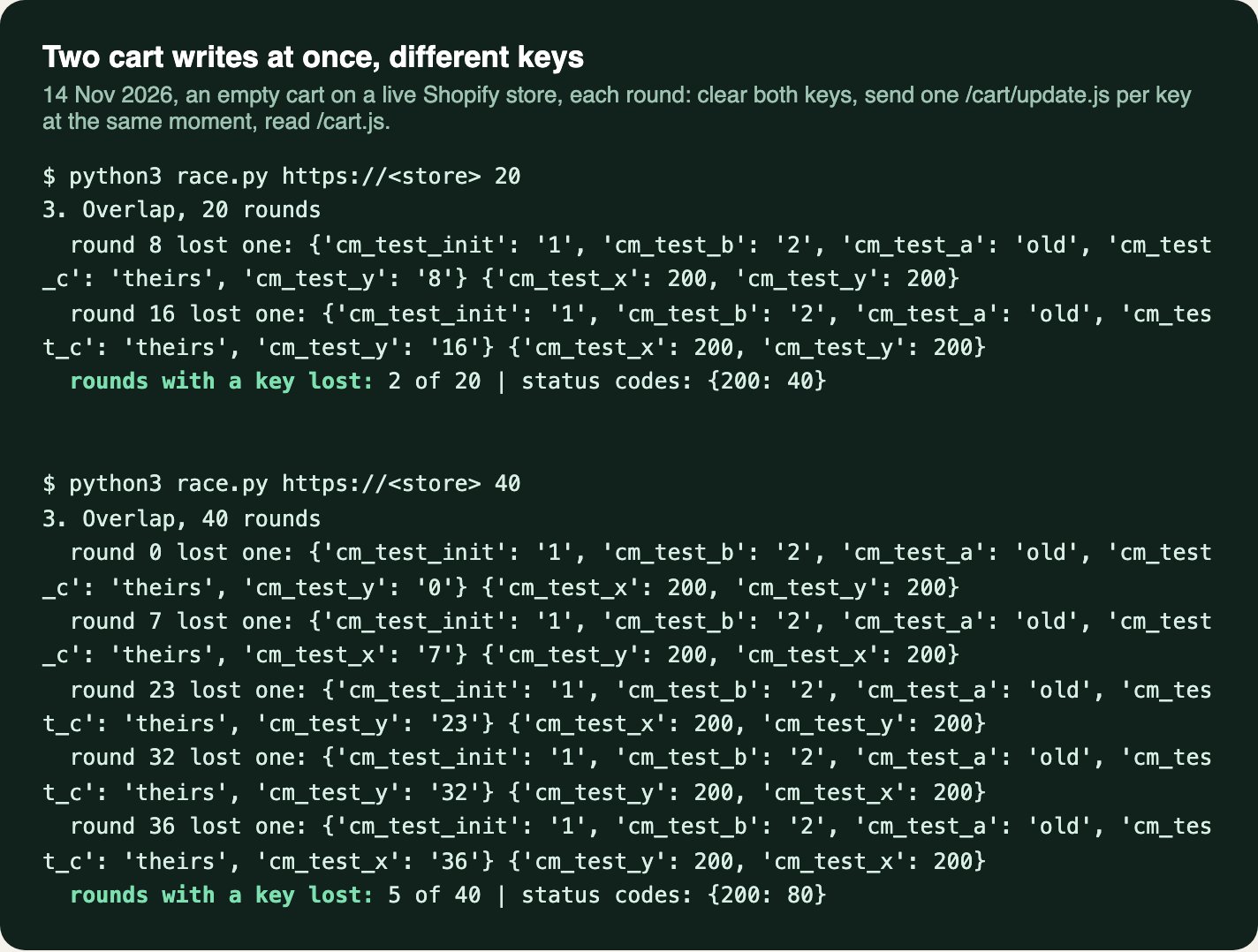
When two scripts write to the cart at the same moment, Shopify can answer both with 200 and keep only one. In our test on a live store, two /cart/update.js calls setting different keys, sent together, left one key missing in 7 of 60 tries. A write built from an older read of the cart puts the older values back the same way.
Send only your own keys. Run your own writes one at a time, each from a fresh read of /cart.js. When the shopper clicks Checkout, read the cart again and save any of your keys that are gone.
01Why a saved attribute goes missing
Cart attributes and the cart note are saved on the cart and copied onto the order: “Attributes set on a cart carry over to the resulting order after checkout” (Shopify, Attribute object). Themes and apps use them for gift messages, delivery dates, where a shopper came from, and figures a checkout block reads. When one is lost from the cart, nothing on the page shows it. The order simply arrives without it.
- 01
Two writes at the same moment
Shopify says that since 10 Oct 2025 its cart APIs run simultaneous requests instead of sometimes dropping one, and answer 409 when there are too many (Shopify changelog, 21 Oct 2025). Running both isn’t the same as merging them. On 14 Nov 2026 we sent two
/cart/update.jscalls at once, 60 times, each setting a different key on the same cart, which already existed. Every call got a 200, and in 7 of the 60 rounds one of the two keys was missing afterwards. Our reading: each request works from the cart as it was when it started, and the one that finishes last saves its copy over the other. On this developer forum thread (Aug 2025 to Mar 2026), a reply puts it plainly: “If attribute B starts being updated before attribute A is finished, you will indeed lose the attribute A value in the process.” - 02
A write built from an older read
A script that reads the cart, waits, then writes back the attributes it read puts back whatever has changed since.
/cart/update.jskeeps keys you don’t send (we checked: savinga, thenb, leaves both; a blank value removes a key), so through it this only happens when a script sends keys it doesn’t own. The Storefront API is stricter. Shopify’s guide to building a cart on it says: “An attribute update replaces the cart’s complete attribute list” (Shopify, Build cart UI). An app writing that way sends every key, each time, from its last read. - 03
The note is one piece of text
The note has no keys: every write replaces all of it. When two things write into it, say an order note box and a gift message, each has to read what the other wrote first. Two saves typed back to back can each start from the note as it was before the other.
- 04
A form that sends what the page held
On a cart page, Checkout submits the cart form, and any
noteorattributes[...]fields go with it, holding what they held when the page was drawn. Dawn’s cart page note is one of these (name="note"on the cart form). Anything a script saved into the note since then is overwritten at the last step.
How it shows up
- Now and then. Most orders are fine, so it’s easy to blame the shopper or Shopify.
- Around an add to cart. One add can set off several writes in the same second: tracking, A/B tests, gift and upsell apps, and the theme’s own.
- On this Shopify Community thread (Mar 2025), a store saving a referral code as an attribute found some orders had it and others didn’t. A reply: “The inconsistency (some orders having the value, others not) suggests a race condition or timing issue.”
02Send only your keys, one at a time, and check before Checkout
For store owners
See what the cart holds
Add a product, then open your store’s address with
/cart.json the end in a new tab. Theattributesandnotenear the top are what the order will get. Reload it after each step in the cart: a value that’s there and then gone is this problem.Look at the orders without it
On an order’s page in the admin, cart attributes show under Additional details (where the store on this Community thread found them gone). Check how the orders missing them were placed: Buy it now and express checkout buttons on a product page skip the cart, so its attributes never get the chance. That needs a different fix.
Count the writes
In Chrome, right-click the page, choose Inspect, then open the Network tab and type
updatein the filter. Add a product. Eachcart/update.jsrow is a write, and the Initiator column names the script that sent it. Several in the same second, from more than one script, is when a key can be lost. Writes through the Storefront API show asgraphql.json.Send it to your developer
With the key that goes missing, the scripts you found and this page. You shouldn’t need to remove an app: the fix is in how your own code writes.
For developers
Send only your own keys
/cart/update.jsleaves keys you don’t send alone, so post only yours:{ attributes: { gift_message: text } }. Never post back an attributes object you read earlier, and never blank another app’s key: a blank value removes it.One write at a time, each from a fresh read
Chain your own writes, and build each one from
/cart.jsread when its turn comes, not from the page. For the note this is the whole fix: read it, change your part, write it back, and only then let the next write start.Check again at Checkout
Other apps’ writes aren’t in your queue. When the shopper clicks Checkout, read
/cart.js, compare your keys with what they should hold, and save any that are gone before letting the click through. Cap the wait (we use 3 seconds), so a slow request never holds the shopper.Make the cart form send current values
If the cart page’s form has
noteorattributes[...]fields, set them in the form’sformdataevent from the full value, so the submit doesn’t write back older text.
(function () {
  'use strict';

  var root = (window.Shopify && Shopify.routes && Shopify.routes.root) || '/';
  var STORE = 'cart-keys'; // sessionStorage: the cart, the keys this script owns, and what they should hold
  var queue = Promise.resolve();

  // The cart's token without its ?key= part.
  function cartId(cart) { return String((cart && cart.token) || '').split('?')[0]; }

  // Your keys and what they should hold, for this cart only. Keys saved on an
  // earlier cart (one already checked out, or one that expired) are left
  // behind, so they never land on the next one.
  function mine(cart) {
    try {
      var s = JSON.parse(sessionStorage.getItem(STORE)) || {};
      return s.cart === cartId(cart) ? s.keys || {} : {};
    } catch (e) { return {}; }
  }

  function remember(cart, own) {
    try { sessionStorage.setItem(STORE, JSON.stringify({ cart: cartId(cart), keys: own })); } catch (e) {}
  }

  function readCart() {
    return fetch(root + 'cart.js', { headers: { Accept: 'application/json' } })
      .then(function (r) { return r.json(); });
  }

  function update(body) {
    return fetch(root + 'cart/update.js', {
      method: 'POST',
      headers: { 'Content-Type': 'application/json', Accept: 'application/json' },
      body: JSON.stringify(body),
    }).then(function (r) {
      if (!r.ok) throw new Error('cart/update.js ' + r.status);
      return r.json();
    });
  }

  // Run fn(cart) once every earlier write has finished, on a fresh read of the cart.
  function withCart(fn) {
    var run = function () { return readCart().then(fn); };
    var next = queue.then(run, run);
    queue = next.catch(function () {});
    return next;
  }

  // Save some of your own keys. Only these keys are sent, so other apps' keys
  // stay as they are. A blank value removes a key.
  function save(keys) {
    return withCart(function (cart) {
      var own = mine(cart);
      Object.keys(keys).forEach(function (k) { own[k] = String(keys[k]); });
      remember(cart, own);
      // The first write of a visit can create the cart: keep the keys with it.
      return update({ attributes: keys }).then(function (saved) {
        remember(saved, own);
        return saved;
      });
    });
  }

  // Read the cart and put back any of your keys that another write undid.
  function check() {
    return withCart(function (cart) {
      var held = cart.attributes || {};
      var own = mine(cart);
      var lost = {};
      Object.keys(own).forEach(function (k) {
        if ((held[k] || '') !== own[k]) lost[k] = own[k];
      });
      if (!Object.keys(lost).length) return null;
      return update({ attributes: lost }).then(function () { return lost; });
    });
  }

  // Checkout buttons that submit the cart form (name="checkout", as in Dawn):
  // check first, then send the form on with the same button. Never wait more
  // than 3 seconds.
  document.addEventListener('submit', function (e) {
    var form = e.target;
    var button = e.submitter;
    if (!button || button.name !== 'checkout' || form.dataset.cartChecked) return;
    e.preventDefault();
    var sent = false;
    var go = function () {
      if (sent) return;
      sent = true;
      form.dataset.cartChecked = 'true'; // let this submit through
      form.requestSubmit(button);
      delete form.dataset.cartChecked;
    };
    setTimeout(go, 3000);
    check().then(go, go);
  });

  window.CartKeys = { save: save, check: check, withCart: withCart };
})();- Load it from
layout/theme.liquidwith<script src="{{ 'cart-keys.js' | asset_url }}" defer></script>, and save through it:CartKeys.save({ gift_message: text }). For the note, useCartKeys.withCartto read it, change your part and write it back in one turn. - What each key should hold is kept in
sessionStoragewith the cart’s token, so the check works on any page of the visit, and a gift message from one order never lands on the next cart in the same tab. If a value is worked out from the cart (a total the drawer draws), work it out again at Checkout instead of trusting a stored copy, as we did on one store below. - Clear your keys through it too (
CartKeys.save({ gift_message: '' })). If the theme blanks one some other way, say when gift wrap is unticked, the check at Checkout puts it back. - The listener is for Checkout buttons that submit the cart form with
name="checkout", as Dawn’s cart page and cart drawer do. A theme whose Checkout is a link needs a click listener instead, with the same 3 second cap. - If the cart form also carries
attributes[...]fields, they’re sent after the check and win. Keep your keys out of the form, or fill those fields from the cart. - We ran this file against a stand-in for the cart endpoints that loses overlapping writes the way we measured. Plain writes two at a time lost a key in 20 of 20 rounds; through
CartKeys.save, in none. A Checkout click put back a key another write had blanked, then went on to checkout with the button’scheckoutvalue, and with the cart answering slowly it went on after 3 seconds. On a new cart in the same tab, it left the last order’s key behind. - Your queue only orders your own writes. Buy it now and express checkouts on a product page skip the cart and this check entirely. Express buttons in the cart or drawer (Shop Pay, Apple Pay, PayPal) do check out the cart, attributes and all, but they don’t submit the cart form, so the check doesn’t run for them. The queue only orders your own writes, so another app’s write can still drop a key on those orders.
- Keys that start with
__are private: Shopify keeps them out of/cart.jsand Liquid (Shopify, Cart API reference), so the check can’t see them and would save them again on every Checkout. Leave private keys out of what the file checks. - One developer on the forum thread above traced their case to two first writes that each created a new cart, leaving one orphaned. If keys go missing only on a shopper’s first add, make sure the cart exists before anything else writes to it.
03Try two writes at once
Count the losses
On a preview of your theme, open the console and run the snippet below. It sends two writes with different keys at the same moment, 20 times, counts the rounds where one went missing, then removes its test keys. Run it again with each
setswapped forCartKeys.save: it should count 0.Undo a key, then click Checkout
Save a key with
CartKeys.save, blank it with a plain/cart/update.jscall as another app would, then click Checkout. In the Network tab, acart/update.jscarrying only your key should go out before the checkout request.Other apps’ keys survive
Compare
/cart.jsbefore and after: every key you don’t own should be unchanged.
(async () => {
  const set = (attributes) => fetch('/cart/update.js', {
    method: 'POST',
    headers: { 'Content-Type': 'application/json' },
    body: JSON.stringify({ attributes }),
  });
  let lost = 0;
  for (let i = 0; i < 20; i++) {
    await set({ test_a: '', test_b: '' });
    await Promise.all([set({ test_a: String(i) }), set({ test_b: String(i) })]);
    const held = (await (await fetch('/cart.js')).json()).attributes;
    if (held.test_a !== String(i) || held.test_b !== String(i)) lost++;
    await new Promise((r) => setTimeout(r, 1000));
  }
  await set({ test_a: '', test_b: '' });
  console.log('Rounds with a key lost:', lost, 'of 20');
})();
From our work
04A checkout line on one store, a gift message on another
On a beauty brand’s store we look after, the checkout shows a red “You save” line. A checkout block can’t see sale prices, so the cart drawer works out the figures and saves them as four hidden cart attributes, and the block reads them.
The cause (10 and 11 Nov 2026). First, two of our own saves in flight could land out of order, leaving the cart a line behind. Then, in live tests on 10 and 11 Nov, about 1 add in 10 lost the four attributes altogether, and the line hid. In the clearest case, the same write also removed a tracking app’s key and an upsell app’s key, both saved well before the add. The only write that overlapped was an A/B testing app’s Storefront API call. That’s one trace, so we can only say it fits the pattern above. The drawer still believed its attributes were saved, so nothing sent them again.
The fix (10 and 11 Nov 2026). The drawer’s saves go one at a time, newest figures next. At Checkout, the theme reads /cart.js, compares it with what the drawer drew, and saves its own four keys again if they differ, never holding Checkout more than 3 seconds. Tested on a preview theme on 11 Nov: the attributes were wiped on their own after an add, Checkout put them back, and the red line matched Shopify’s own total savings. On 14 Nov 2026 the live theme carries the check.
On Thameen London (10 Nov 2026) the gift message had to reach the warehouse system (Unleashed), which reads the order note, so it now also goes at the end of the note. That put two boxes into one piece of text. Each note save now reads the cart first and waits for the one before it. The bag’s note box shows only the shopper’s own words, unticking gift wrap takes the message back out, and on the cart page the Checkout submit adds the message back, so the form doesn’t drop it from the note. On 14 Nov 2026 the live theme carries it.
- In our live log“Basket notes no longer vanish at checkout”
- In our log“Gift messages now reach the warehouse system via the order note”
The bigger picture
05Many apps, one cart
Every app on the cart writes to the same record, and none of them knows what the others are doing. Each new tracking, testing, gift or delivery-date app is another writer, and the losses grow quietly, one order at a time. If your warehouse or your reports rely on cart attributes, check a sample of orders after each new app goes in.
Making the theme and its apps share the cart without losing anything is part of our development work.
06Sources
Every step and claim above comes from one of these, or from the fix on the store it describes.
- Shopify developers: Storefront API, Attribute object
- Shopify developers: Cart API reference (/cart.js, /cart/update.js)
- Shopify developer changelog: Improved concurrency handling in the Cart AJAX API (21 Oct 2025)
- Shopify developers: Build cart UI (attribute updates replace the list)
- Shopify Dawn theme: sections/main-cart-footer.liquid (note and Checkout on the cart form)
- Shopify developer community: Potential race conditions with cart update ajax call (Aug 2025 to Mar 2026)
- Shopify Community: Missing attributes data in orders (Mar 2025)
- Shopify Community: Attribute data recently stopped coming through on orders (Jun 2023 to Feb 2024)
Sources checked on .