Fixes · Cookie consent and tracking
Hotjar or Clarity loads before cookie consent
The fix
A tag pasted into theme.liquid loads on every visit, whatever the shopper picks on the cookie banner. Some consent apps block known tags for you, often only on a paid plan; many banners only record the choice.
Load the tag from a small script instead: straight away when Shopify’s Customer Privacy API says analytics is allowed, or the moment the shopper accepts. If they decline later, tell the tag to stop and clear its cookies.
01Why the banner doesn’t stop it
A cookie banner records the shopper’s choice. It stops a script only if something checks that choice before the script runs. On Shopify, the choice goes to the Customer Privacy API, which in Shopify’s words is “used to apply consent decisions to Shopify-managed surfaces, like pixels, audiences, and checkout” (Shopify, Customer Privacy API). A tag pasted into the theme isn’t one of those. The browser runs it as soon as it reads it.
- 01
The banner records, it doesn’t block
Some consent apps can hold known tags back until the shopper agrees, but it’s often a plan feature. Pandectes, for one, lists its “Auto blocker” on its Premium and Enterprise plans, not Basic or Plus (Pandectes pricing, checked 14 Nov 2026). Without it, the banner shows and the tag runs anyway.
- 02
Heatmaps can’t run as a custom pixel
The tidy home for tracking code is a custom pixel under Settings > Customer events, which Shopify runs only with the permissions you set for it (Shopify, Pixel privacy). But custom pixels run in a sandbox, and “Traditional Javascript pixels that are placed in the lax sandbox cannot access the top frame” (Shopify, About web pixels). A heatmap or session recording needs the page itself, so a Hotjar or Clarity tag added by hand ends up in the theme, outside Shopify’s consent handling. (Shopify does let approved recording apps in through app pixels: its Advanced DOM Events are “for apps providing session recording and/or heatmaps” (Shopify, Advanced DOM Events), and app pixels wait for the shopper’s consent where it’s needed.)
- 03
The vendors now expect a signal
Microsoft says that since 31 Oct 2025, “Clarity begins enforcing consent signal requirements for page visits originating from the European Economic Area (EEA), United Kingdom (UK), and Switzerland (CH)” (Microsoft, Consent management). Without a yes from those regions, Clarity sets no cookies, but its tag still runs: “Clarity tag loads, but only cookieless data is collected.” For Shopify, its table says Clarity “auto detects consent once Shopify cookie banner is enabled” (Microsoft, Cookie consent for third-party platforms). Owners aren’t sure: on this Shopify Community thread (Sep to Oct 2025), one reply says Shopify’s banner “does not currently pass consent information to third-party scripts like Microsoft Clarity”, and a later one points to Microsoft’s page. Microsoft’s note covers Shopify’s own banner; with a third-party banner, don’t count on it. Hotjar accounts are moving onto Contentsquare, and the existing Hotjar code carries on sending data there (Contentsquare). Contentsquare’s own tag sets a visitor cookie,
_cs_id, for 13 months (Contentsquare, Cookies).
Why nobody notices
- The store looks the same either way. Nothing on the page says a recording has started.
- Where you are matters. Shopify allows every purpose by default in regions the store hasn’t set to need consent: “For other regions, the default behavior is to allow all processing purposes” (Shopify, Customer Privacy API). A test from outside those regions shows the tag loading, as it should.
- On this older Community thread (Aug 2023 to Jun 2025), an owner asked where Clarity’s consent code goes in the theme. The only reply, two years on, said they’d been told Shopify’s banner isn’t compatible with Clarity.
02Load the tag from Shopify’s consent, not before it
For store owners
Find where the tag comes from
In Online Store > Themes > Edit code, open
layout/theme.liquidand search forhotjar,contentsquareorclarity. If it’s there, it loads on every visit. If it isn’t, it may come from an app or a Google Tag Manager container, each with its own consent settings.Check your banner tells Shopify
Accept on the banner, then right-click the page, choose Inspect, open the Console and type
Shopify.customerPrivacy.currentVisitorConsent(). Analytics should sayyes. If it stays empty, the banner keeps the choice to itself, and nothing that listens to Shopify will hear it: ask the banner’s maker. Shopify’s own banner always tells Shopify.Or let the banner block it
If your consent app can block scripts on a higher plan, that works too. Check it names your tag once it’s on, and test it as below.
Send it to your developer
With where the tag is, which banner you use and this page. The change is one small file in the theme.
For developers
Take the tag out of the head
Remove the vendor’s snippet from
theme.liquidand render the file below once in the head instead. It isn’t drawn in the theme editor (request.design_mode), so editing the theme doesn’t record sessions.Ask, then listen
On load, the script asks the Customer Privacy API whether analytics is allowed and loads the tag if so. It also listens for
visitorConsentCollected, which Shopify sends when the choice changes. Shopify notes that “Updates are published only when consent changes, not when the listener is added”, so you need both.Wait for the API, whatever the version
Shopify.loadFeaturesisn’t there yet when the head is read, so wait forDOMContentLoaded. And if an app has already loaded the API at another version,loadFeaturesreports an error. On one store we tested, asking for 0.2 gave “consent-tracking-api@0.2 has already been loaded at version 0.1”, and the API arrived a moment later. A script that gives up on that error never loads the tag, even after the shopper accepts. Wait forShopify.customerPrivacyeither way. It works the other way round too: if your consent app asks for 0.1 and our script loads first, the app gets that error, so if your app asks for 0.1, ask for 0.1 too.Undo it on decline
A shopper who accepts and later declines (from a reopen link or icon) already has the tag running. Tell it to stop: Contentsquare’s
_uxa.push(['optout'])removes its cookies and sets_cs_optout(Contentsquare, Send the users’ decisions); Clarity’sclarity('consent', false)clears its cookies (Microsoft, Consent API v2).
{% doc %}
  Hotjar / Contentsquare tag, added only once Shopify's Customer Privacy API
  allows analytics: straight away where it's allowed, or when the shopper
  accepts. Render it once in layout/theme.liquid's head. Not drawn in the
  theme editor.

  @example
  {% render 'consent-gated-tag' %}
{% enddoc %}
{%- unless request.design_mode -%}
  <script>
    (function () {
      var loaded = false;

      function load() {
        if (loaded) return;
        loaded = true;
        var s = document.createElement('script');
        s.src = 'https://t.contentsquare.net/uxa/YOUR-TAG-ID.js';
        s.async = true;
        document.head.appendChild(s);
      }

      // A shopper who accepted and then said no: stop the tag and clear its cookies.
      function revoke() {
        window._uxa = window._uxa || [];
        window._uxa.push(['optout']);
      }

      document.addEventListener('visitorConsentCollected', function (e) {
        if (!e.detail) return;
        if (e.detail.analyticsAllowed) load();
        else if (loaded) revoke();
      });

      // Wait up to 5 seconds for the API to be there.
      function whenReady(fn, tries) {
        if (window.Shopify && Shopify.customerPrivacy) return fn();
        if ((tries || 0) < 50) setTimeout(function () { whenReady(fn, (tries || 0) + 1); }, 100);
      }

      function init() {
        if (!window.Shopify || !Shopify.loadFeatures) return;
        // If an app on the page has already asked for another version of the API,
        // this call reports an error, but the API still arrives: wait for it either way.
        Shopify.loadFeatures([{ name: 'consent-tracking-api', version: '0.2' }], function () {
          whenReady(function () {
            if (Shopify.customerPrivacy.analyticsProcessingAllowed()) load();
          });
        });
      }

      if (document.readyState === 'loading') document.addEventListener('DOMContentLoaded', init);
      else init();
    })();
  </script>
{%- endunless -%}function load() {
if (!loaded) {
loaded = true;
(function (c, l, a, r, i, t, y) {
c[a] = c[a] || function () { (c[a].q = c[a].q || []).push(arguments); };
t = l.createElement(r); t.async = 1; t.src = 'https://www.clarity.ms/tag/' + i;
y = l.getElementsByTagName(r)[0]; y.parentNode.insertBefore(t, y);
})(window, document, 'clarity', 'script', 'YOUR-PROJECT-ID');
}
// Tell Clarity on every yes, so a shopper who declines and then accepts
// again on the same page is recorded again. ad_Storage shares data with
// Microsoft Ads: leave it denied unless you use that and the shopper
// allowed marketing.
window.clarity('consentv2', { ad_Storage: 'denied', analytics_Storage: 'granted' });
}
// Clears Clarity's cookies and stops it until the next yes.
function revoke() {
window.clarity('consent', false);
}- Render it with
{% render 'consent-gated-tag' %}in the head oflayout/theme.liquid. Above or below{{ content_for_header }}both work, since it waits for the page. - The tag loads a moment later than a pasted one, after the page is parsed. For heatmaps and recordings that’s fine.
- It gates on analytics. If your tag is also used for ads, check
marketingAllowed()as well. - We tested the Contentsquare version on a live store. We haven’t run the Clarity version on a store: its two calls are as Microsoft documents them.
- Contentsquare documents no command to opt back in, and its
_cs_optoutcookie lasts 13 months (Contentsquare, Cookies). A shopper who declines after accepting stays out of the recordings even if they accept again later, until that cookie goes. - If the store still has Hotjar’s own snippet (
static.hotjar.com), put it insideload()in place of the Contentsquare lines. We haven’t testedrevoke()with that snippet: after a decline, check that its_hjcookies go. - If your banner doesn’t pass the choice to Shopify (the owner check above), this has nothing to listen to and the tag only loads where consent isn’t needed. Fix the banner first.
03Test it from a shopper’s side
Before choosing
In a private window, open the store with the Network tab open and type
contentsquare,hotjarorclarityin the filter. Don’t touch the banner. Nothing should load. If the banner doesn’t show where you are, analytics is allowed there by default and the tag loads: decline through the banner’s reopen link (or in the console withShopify.customerPrivacy.setTrackingConsent({ analytics: false, marketing: false, preferences: false, sale_of_data: false }, () => {}), in a test browser only) and reload.Accept
The tag’s requests should appear straight away, without a reload, and on every page after.
Decline after accepting
In the Application tab under Cookies, the tag’s cookies (
_cs_id,_cs_sand_cs_cfor Contentsquare, which leaves_cs_optoutin their place;_clckand_clskfor Clarity, as Microsoft lists them) should go, and the next page should load no tag.
From our work
04A fashion brand’s new heatmap tag
On a fashion brand’s store we look after, the team asked for a Contentsquare (formerly Hotjar) tag on 9 Nov 2026. The store’s consent app is on a plan that doesn’t block scripts, so pasting the tag would have recorded every visitor, banner or not.
The fix (9 Nov 2026). One snippet, rendered once in the head, adds the tag only once Shopify’s consent API allows analytics: straight away where no consent is needed, or when the shopper accepts. It isn’t drawn in the theme editor.
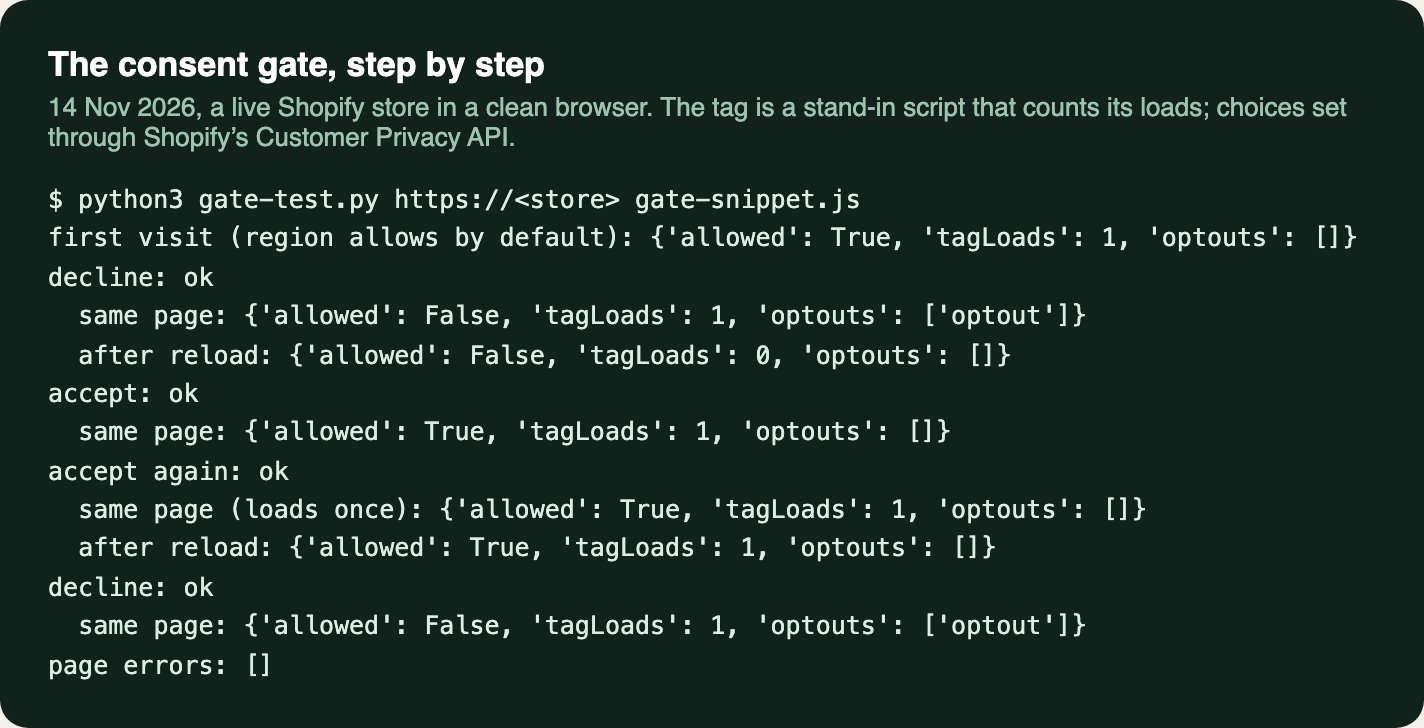
Checked on the live store (14 Nov 2026) in a clean browser, setting choices through Shopify’s Customer Privacy API, since the banner doesn’t show where we tested from. With no choice made, our region allowed analytics and the tag loaded. After declining and reloading, it didn’t. Accepting loaded it straight away, and again on the next page. Declining after accepting left Contentsquare’s _cs_id, _cs_s and _cs_c cookies in place; with the opt-out call added in our browser, they were removed and _cs_optout was set. That’s why the code above has revoke().
- In our live log“Visitor behaviour tracking now respects cookie consent choices”
The bigger picture
05Every tag on the store
A tag added to the theme by hand sits outside Shopify’s consent handling, and nobody sees it load early, because the store looks the same. If tags have been added over the years (heatmaps, chat, reviews, ad pixels), a pass in a private window from a region that needs consent shows which ones run before the banner is answered.
Checking what a store loads, and when, is part of our support work.
06Sources
Every step and claim above comes from one of these, or from the fix on the store it describes.
- Shopify developers: Customer Privacy API
- Shopify developers: Pixel privacy
- Shopify developers: About web pixels (lax sandbox)
- Shopify developers: Advanced DOM Events (session recording and heatmap apps)
- Shopify Help Center: Privacy settings, cookie banner
- Microsoft Clarity: Consent management
- Microsoft Clarity: Cookie consent for third-party platforms
- Microsoft Clarity: Cookie Consent API, ConsentV2
- Microsoft Clarity: Clarity cookies
- Contentsquare: Send the users’ decisions about data collection
- Contentsquare: Cookies
- Contentsquare: Hotjar’s next evolution
- Pandectes: Pricing plans
- Shopify Community: How to implement Microsoft Clarity cookie consent with Shopify’s built-in cookie banner? (Sep to Oct 2025)
- Shopify Community: Cookie consent bar (Privacy & Compliance app) with Microsoft Clarity (Aug 2023 to Jun 2025)
Sources checked on .